If you are using multiple on-premise and cloud based apps, miniOrange provides a single sign on platform with many supported integrations for a simple and secure way for your students to sign in.
About miniOrange
If you are a business that has an existing application or site where user login credentials are stored, miniOrange provides an integrated solution to allow your students to use their existing credentials to log into Thinkific. This way, Thinkific students will not need to maintain separate login credentials for your Thinkific site!
If you were considering creating a custom single sign on (SSO) solution, miniOrange can help reduce custom development needed to integrate with Thinkific and they have a ton more integrations that you can check out here: Instant Integrations
With protocol brokering, users will be able to connect to any external Identity Provider or User Store with the Thinkific Platform. Multi-factor authentication validates user identity with passwords and adds an additional layer of authentication. This additional layer prevents an unauthorized person from accessing the resources even if they know your username and password.
miniOrange provides various security solutions SSO, MFA, Social Login, Network Security, API Security, etc. Their solutions are specific, accurate and most importantly, make IT more secure.
How to Get Started
Check out miniOrange's set up instructions here: Single Sign On For Thinkific
JWT Endpoint URL
For the JWT Endpoint URL required, you can follow miniOrange's example URL: https://{your-school}.thinkific.com/api/sso/v2/sso/jwt
{your-school} can be replaced with your Thinkific subdomain. If you're not sure what that is, check out: What is my Thinkific subdomain?
How to Copy Your API Key
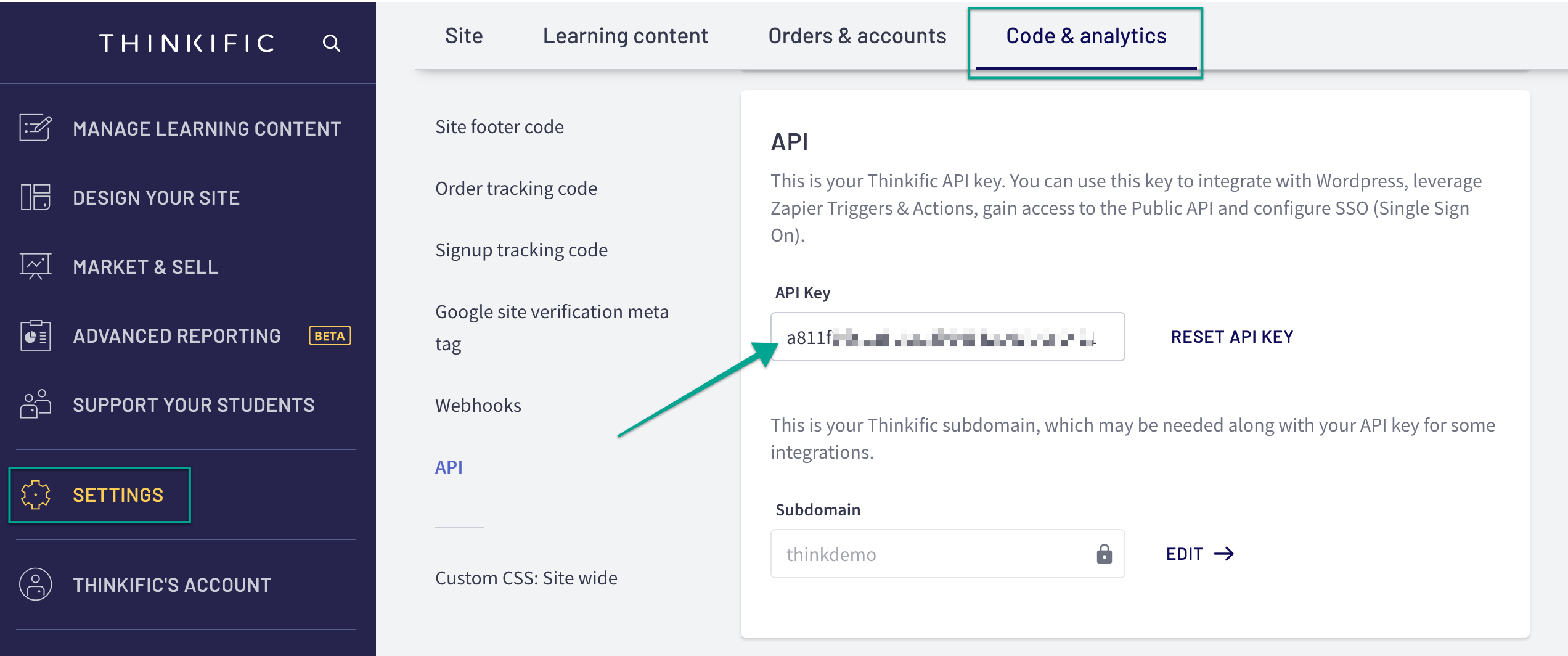
You can access your API Key using the following instructions. To keep your Thinkific account secure, make sure never to share this API Key!
- Login to your Thinkific account
- Go to Settings
- Select the Code & analytics tab
- Select API on the left menu
- You can copy your key under API Key
Important Considerations
When setting up a single sign on (SSO) solution, we recommend reaching out to a developer to help customize your student experience to account for single sign on. Here are a few common customizations you might consider to create a more holistic student experience:
- Redirect the create an account page/sign in page
- Hide or remove password reset buttons
- Hide login fields from the My Account area of student accounts (accessed at yoursite.thinkific.com/account)
These changes require some theme customizations. We do not provide support for code customizations, however we have have some wonderful freelance web developers on our Thinkific Experts page who you can reach out to if you need! There's also the Thinkific Store on Fiverr, for smaller, quicker jobs. Many course creators also use upwork.com for hiring developers.
You can see more details on editing theme code here: Custom Themes (For Developers)
Looking for more apps? We're adding new apps to the platform every day. Check out the Thinkific App Store!