Replace your thinkific.com URL with a branded Bluehost domain! See Custom Domains for more general information or if you have a different domain host.
How to Set Up a CNAME Record in Bluehost
- Log into your Bluehost account
- Select domains, then zone editor, and choose the domain you'd like to have your Thinkific site available at.
- Select Add DNS Record and fill out the following fields
- Host Record: This will be your desired subdomain. A subdomain precedes your main domain name. For example in www.yoursite.com, www is the subdomain. What you enter here will affect which URL your Thinkific site will be available at. www, learn, or courses are popular subdomain choices.
- TTL: Leave the default value. It is often 3600, but may be different depending on your account type.
- Type: CNAME
- Points To: This will be your Thinkific URL. You will want to copy the exact URL of your Thinkific site, which will be formatted as: yoursite.thinkific.com.
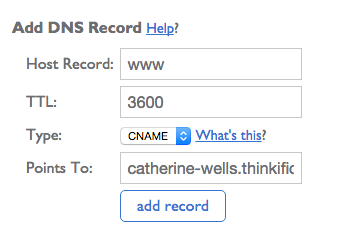
- Next, select add record to save your CNAME record.
Next Steps
Once you have created your CNAME record, refer to the following for testing out your changes and setting your custom domain as the primary domain for your site!
How to Add Your Custom Domain to Thinkific
How to Test Your Custom Domain
Please contact Bluehost directly and send them a link to this article if you need a hand with setting up your CNAME record.
More About Custom Domains
Custom Domain Frequently Asked Questions
How Do I Access My Site Without WWW?
I Can't Access My Thinkific Site after Adding My Custom Domain